# Utilizando o Arquivo Morto
Com o passar do tempo os arquivos de movimentação do Sistema tornam-se sobrecarregados de informações, o que poderá ocasionar lentidão no sistema. Para evitar este tipo de problema, os dados de anos anteriores podem ser enviados para o **Arquivo Morto**, liberando o arquivo principal destas informações que não são frequentemente acessadas.**SEMPRE, antes de enviar informações para o Arquivo Morto, faça uma Cópia de Segurança **
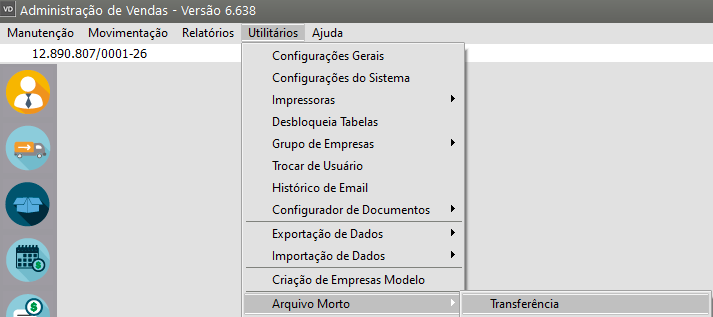
Para enviar informações para o **Arquivo Morto**, acesse o menu **Utilitários>Arquivo Morto>Transferência**
[](https://autoatendimento.grupoallegus.com.br/uploads/images/gallery/2024-01/6NSimage.png)
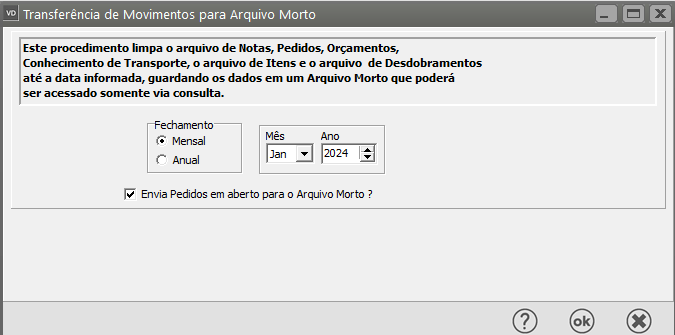
Defina o mês ou ano que deverá ser enviado para o arquivo morto e clique **OK**.
[](https://autoatendimento.grupoallegus.com.br/uploads/images/gallery/2024-01/LXTimage.png)
**IMPORTANTE: **
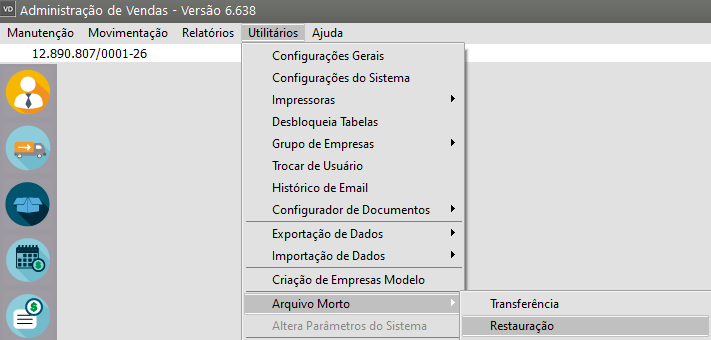
- Lembre-se de que as informações enviadas para o arquivo morto somente podem ser acessadas para **consulta**. Então, somente envie períodos antigos, ou seja, para os quais não irão ocorrer mudanças ou não haja a necessidade de impressão de relatórios.Caso seja enviada alguma informação para o **Arquivo Morto** e haja necessidade de emitir relatórios do período enviado, você poderá Recuperar estes dados, ou seja, retornar os dados do arquivo morto para o arquivo principal. Para isso, acesse o menu **Utilitários>Arquivo Morto>Restauração**
[](https://autoatendimento.grupoallegus.com.br/uploads/images/gallery/2024-01/EHNimage.png)
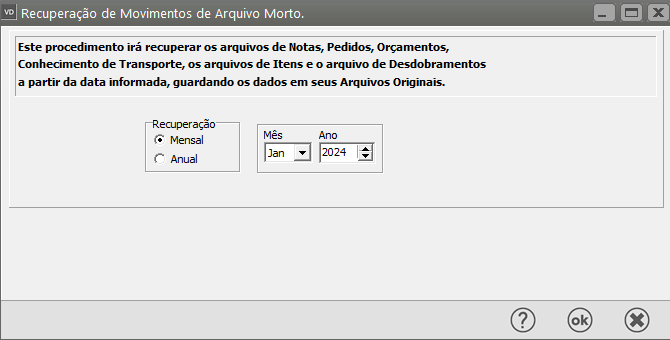
**In**forme o período que deseja recuperar.
[](https://autoatendimento.grupoallegus.com.br/uploads/images/gallery/2024-01/BSjimage.png)
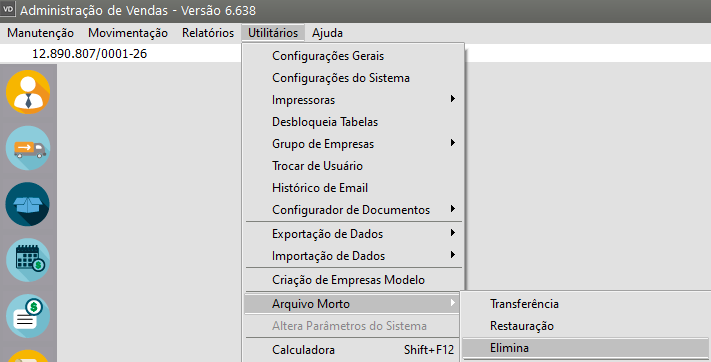
Existe também a possibilidade de exclusão definitiva de todos os movimentos que estão no arquivo morto.Para isso, acesse o menu **Utilitários>Arquivo Morto>Elimina**
[](https://autoatendimento.grupoallegus.com.br/uploads/images/gallery/2024-01/m4wimage.png)
**Mas ATENÇÃO: **
- Você somente deve excluir os dados que tem certeza que não precisará mais acessar nem tirar relatórios. Esta exclusão é definitiva, **sem possibilidade de recuperação**.
- Recomendamos que os dados somente sejam definitivamente excluídos depois que você executar uma cópia de segurança extra destes dados (ver item [Mantendo a Segurança do Sistema).](https://autoatendimento.grupoallegus.com.br/books/vendasne-documentos-eletronicos/page/mantendo-a-seguranca-do-sistema-copia-de-seguranca)
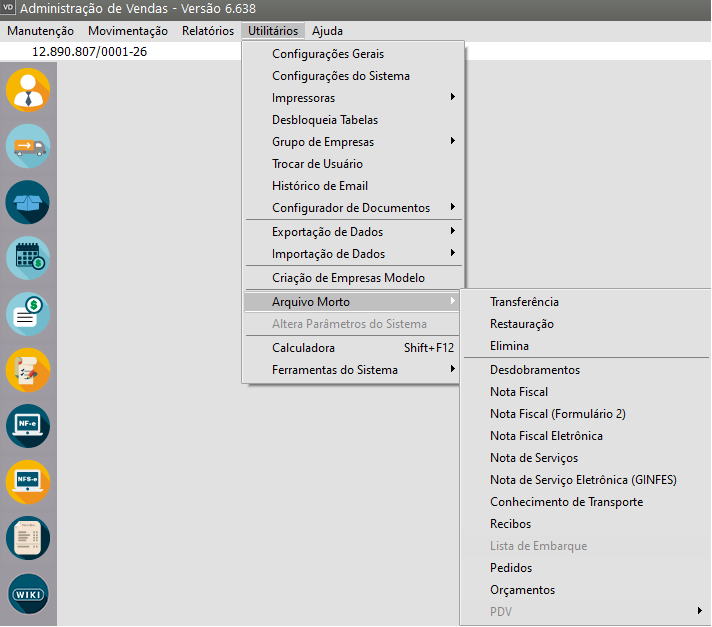
Você poderá ainda realizar consultar e visualizar as informações que foram enviadas para o Arquivo Morto, para isso acesse o menu **Utilitários>Arquivo Morto**
[](https://autoatendimento.grupoallegus.com.br/uploads/images/gallery/2026-06/image.png)
- Desdobramento
- Nota Fiscal
- Nota Fiscal (Formulário 2)
- Nota Fiscal Eletrônica
- Nota de Serviço
- Nota de Serviço Eletrônica (Ginfes)
- Conhecimento de Transporte
- Recibos
- Lista de Embarque
- Pedidos
- Orçamento
- PDV
**Veja também os Itens:**
- [Utilizando o Arquivo Morto](https://autoatendimento.grupoallegus.com.br/books/vendasne-documentos-eletronicos/page/utilizando-o-arquivo-morto)
- [Consulta o Arquivo Morto - Conhecimento de Transporte](https://autoatendimento.grupoallegus.com.br/books/vendasne-documentos-eletronicos/page/consulta-o-arquivo-morto-conhecimento-de-transporte)
- [Consulta o Arquivo Morto - Desdobramentos](https://autoatendimento.grupoallegus.com.br/books/vendasne-documentos-eletronicos/page/consulta-o-arquivo-morto-desdobramentos)
- [Arquivo Morto - Eliminação](https://autoatendimento.grupoallegus.com.br/books/vendasne-documentos-eletronicos/page/arquivo-morto-eliminacao)
- [Consulta o Arquivo Morto - Lista de Embarque](https://autoatendimento.grupoallegus.com.br/books/vendasne-documentos-eletronicos/page/consulta-o-arquivo-morto-lista-de-embarque)
- [Consulta o Arquivo Morto - Nota Fiscal](https://autoatendimento.grupoallegus.com.br/books/vendasne-documentos-eletronicos/page/consulta-o-arquivo-morto-nota-fiscal)
- [Consulta o Arquivo Morto - Nota Fiscal (Formulário 2)](https://autoatendimento.grupoallegus.com.br/books/vendasne-documentos-eletronicos/page/consulta-o-arquivo-morto-nota-fiscal-formulario-2)
- [Consulta o Arquivo Morto - Nota Fiscal Eletrônica](https://autoatendimento.grupoallegus.com.br/books/vendasne-documentos-eletronicos/page/consulta-o-arquivo-morto-nota-fiscal-eletronica)
- [Consulta o Arquivo Morto - Nota de Serviço Eletrônica (GINFES)](https://autoatendimento.grupoallegus.com.br/books/vendasne-documentos-eletronicos/page/consulta-o-arquivo-morto-nota-de-servico-eletronica-ginfes)
- [Consulta o Arquivo Morto - Nota de Serviço](https://autoatendimento.grupoallegus.com.br/books/vendasne-documentos-eletronicos/page/consulta-o-arquivo-morto-nota-de-servico)
- [Consulta o Arquivo Morto - Orçamentos](https://autoatendimento.grupoallegus.com.br/books/vendasne-documentos-eletronicos/page/consulta-o-arquivo-morto-orcamentos)
- [Consulta o Arquivo Morto - PDV (Cupom Fiscal)](https://autoatendimento.grupoallegus.com.br/books/vendasne-documentos-eletronicos/page/consulta-o-arquivo-morto-pdv-cupom-fiscal)
- [Consulta o Arquivo Morto - PDV (Fechamento de Vendas)](https://autoatendimento.grupoallegus.com.br/books/vendasne-documentos-eletronicos/page/consulta-o-arquivo-morto-pdv-fechamento-de-venda)
- [Consulta o Arquivo Morto - PDV (Redução Z)](https://autoatendimento.grupoallegus.com.br/books/vendasne-documentos-eletronicos/page/consulta-o-arquivo-morto-pdv-fechamento-de-venda)
- [Consulta o Arquivo Morto - Pedidos](https://autoatendimento.grupoallegus.com.br/books/vendasne-documentos-eletronicos/page/consulta-o-arquivo-morto-pedidos)
- [Consulta o Arquivo Morto - Recibos](https://autoatendimento.grupoallegus.com.br/books/vendasne-documentos-eletronicos/page/consulta-o-arquivo-morto-recibos)
- [Restauração do Arquivo Morto](https://autoatendimento.grupoallegus.com.br/books/vendasne-documentos-eletronicos/page/restauracao-do-arquivo-morto)
- [Transferência para o Arquivo Morto](https://autoatendimento.grupoallegus.com.br/books/vendasne-documentos-eletronicos/page/transferencia-para-o-arquivo-morto)