# Exportando dados para o Sistema Livros Fiscais
A exportação para o **Sistema Livros Fiscais** não exige parametrização prévia Para que a integração ocorra é necessário que o [Código Fiscal](https://autoatendimento.grupoallegus.com.br/books/vdne/page/cadastrando-o-plano-fiscal-cfop-codigo-fiscal-de-operacoes) esteja integrado ao **Sistema Livros Fiscais** [(](https://autoatendimento.grupoallegus.com.br/books/vdne/page/parametrizando-a-empresa)[ver item Cadastrando Plano Fiscal).](https://autoatendimento.grupoallegus.com.br/books/vdne/page/cadastrando-o-plano-fiscal-cfop-codigo-fiscal-de-operacoes)
[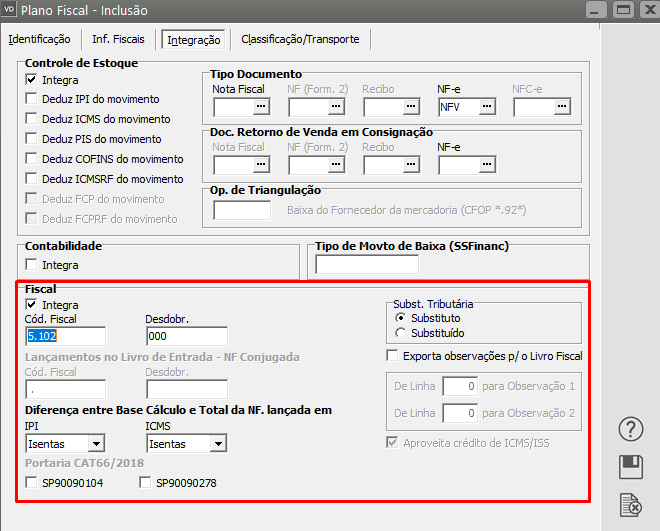](https://autoatendimento.grupoallegus.com.br/uploads/images/gallery/2023-12/i3dimage.png)
- Serão exportadas os documentos cujas datas de emissão estiverem dentro do período informado.
- Para os documentos que possuírem mais de um [código fiscal](https://autoatendimento.grupoallegus.com.br/books/vdne/page/cadastrando-o-plano-fiscal-cfop-codigo-fiscal-de-operacoes) e/ou mais de uma alíquota de ICMS o sistema irá gerar mais de um lançamento para o mesmo documento no Livro de Saídas.
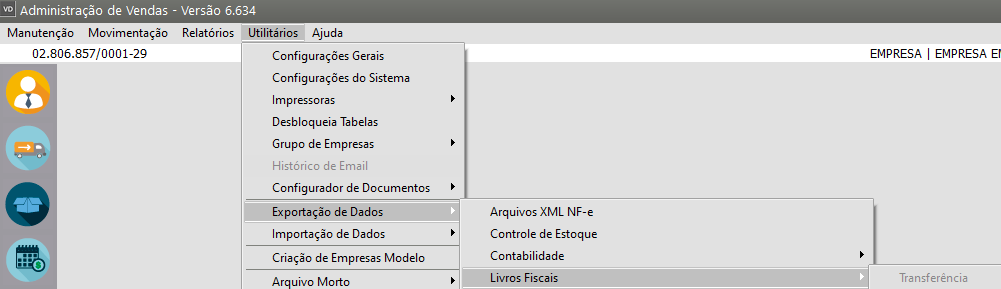
- No caso de sua empresa possuir desdobramentos por [Centros de Custo](https://autoatendimento.grupoallegus.com.br/books/vdne/page/cadastrando-centros-de-custo), os valores serão rateados por [código fiscal.](https://autoatendimento.grupoallegus.com.br/books/vdne/page/cadastrando-o-plano-fiscal-cfop-codigo-fiscal-de-operacoes)Para exportar as informações para o **Sistema Livros Fiscais** você deverá acessar o menu **Utilitários>Exportação de Dados>Livros Fiscais****Transferência**
[](https://autoatendimento.grupoallegus.com.br/uploads/images/gallery/2023-12/8RXimage.png)
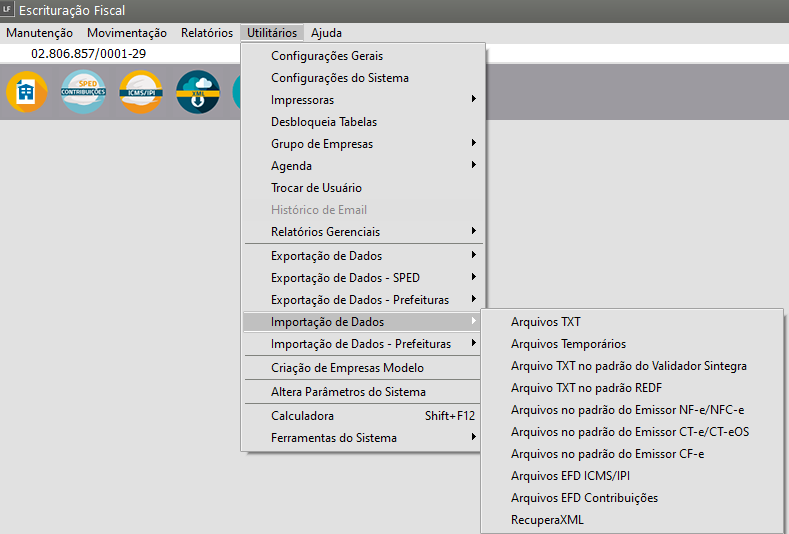
A transferência para o **Sistema Livros Fiscais** também pode ser efetuada por arquivo. Desse modo, será gerado um arquivo texto contendo as informações, que pode ser importado pelo **Sistema Livros Fiscais.****Arquivo****** **[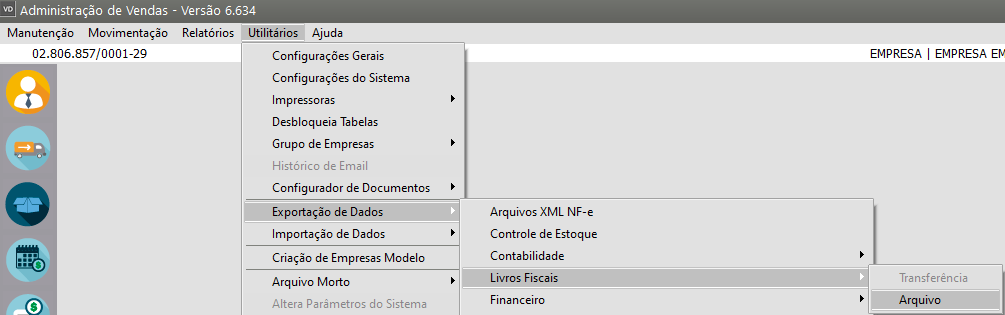](https://autoatendimento.grupoallegus.com.br/uploads/images/gallery/2023-12/Qt3image.png)**Se você optou por realizar a exportação de dados via arquivo, acesse o **Sistema Livros Fiscais** no menu **Utilitários>Importação de Dados>Arquivo TXT** e faça a importação das informações
[](https://autoatendimento.grupoallegus.com.br/uploads/images/gallery/2023-12/AhKimage.png)
**Veja também os Itens:**
- [Exportando dados para os Livros Fiscais](https://autoatendimento.grupoallegus.com.br/books/vdne/page/exportando-dados-para-os-livros-fiscais)
- [Exportando dados para os Livros Fiscais através da Geração de Arquivo](https://autoatendimento.grupoallegus.com.br/books/vdne/page/exportando-dados-para-os-livros-fiscais-atraves-da-geracao-de-arquivo)
- [Emissão de Nota Fiscal para Empresa que Possui Regime Misto (PIS e COFINS) e Exportação para o Sistema Livros Fiscais](https://autoatendimento.grupoallegus.com.br/books/vdne/page/emissao-de-nota-fiscal-para-empresa-que-possui-regime-misto-pis-e-cofins-e-exportacao-para-o-sistema-livros-fiscais)