# Relacionando Eventos com a Homolognet
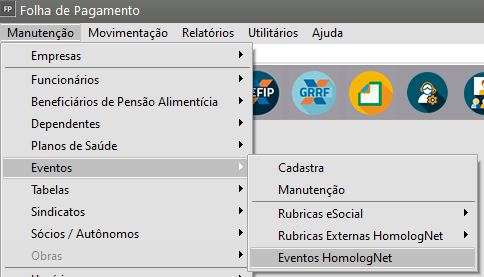
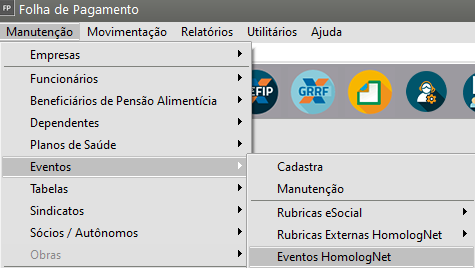
Acessando o menu **Manutenção>Eventos HomologNet** você poderá relacionar os eventos utilizados no **Sistema Folha de Pagamento** com os eventos disponibilizados pela exportação de dados para **HomologNet.**
- Rubricas eSocial
- Rubricas Externas HomologNet
- Eventos HomologNet
[](https://autoatendimento.grupoallegus.com.br/uploads/images/gallery/2024-11/fr9image.png)
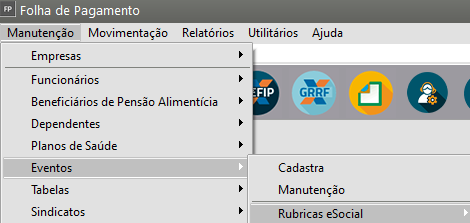
1) No menu **Manutenção>Eventos>Rubricas eSocial**
[](https://autoatendimento.grupoallegus.com.br/uploads/images/gallery/2024-11/wYZimage.png)
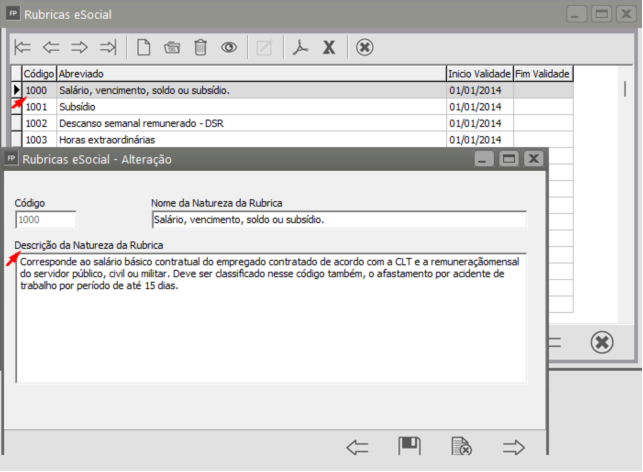
A tabela apresentada trará as informações:
- Código da rubrica
- Abreviado da rubrica
- Início da Validade
- Fim da ValidadeAo editar/visualizar a rubrica, você conseguirá ver a **Descrição da Natureza da Rubrica**
[](https://autoatendimento.grupoallegus.com.br/uploads/images/gallery/2023-05/image-1683751891107.png)
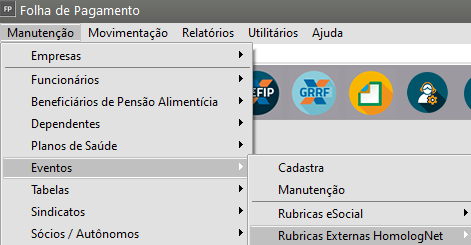
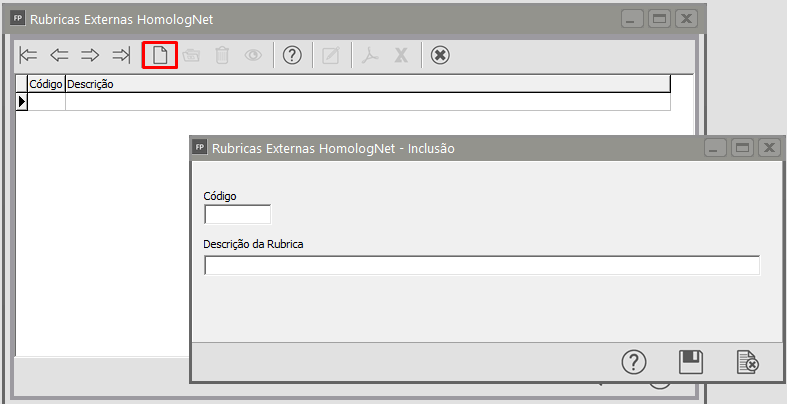
2\) No menu **Manutenção>Eventos>Rubricas Externas HomologNet>Manutenção**
[](https://autoatendimento.grupoallegus.com.br/uploads/images/gallery/2024-11/YwTimage.png)
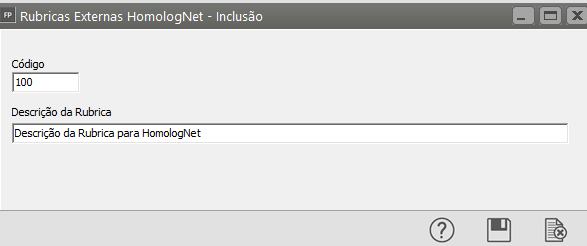
Você deverá cadastrar o **Código e a Descrição da Rubrica para HomologNet**
[](https://autoatendimento.grupoallegus.com.br/uploads/images/gallery/2024-11/k4ximage.png)
[](https://autoatendimento.grupoallegus.com.br/uploads/images/gallery/2024-11/FBDimage.png)
3\) No menu **Manutenção>Eventos>Eventos HomologNet**
[](https://autoatendimento.grupoallegus.com.br/uploads/images/gallery/2024-11/jUZimage.png)
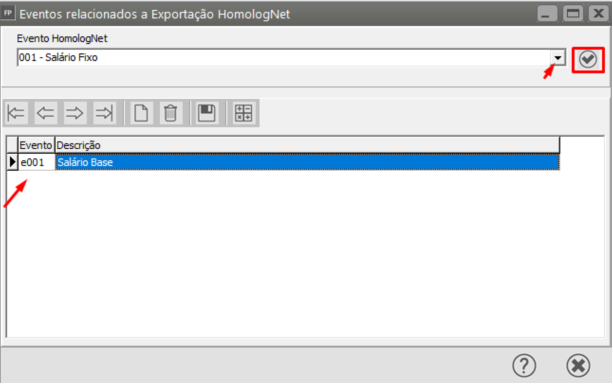
Defina o **Evento HomologNet,** em seguida clique no **botão para validar a informação**
O Sistema irá trazer o **número do evento** e caso seja necessário, clique no botão novo para fazer novo relacionamento
[](https://autoatendimento.grupoallegus.com.br/uploads/images/gallery/2023-05/image-1683751917521.png)
**Veja também os Itens:**
- [Relacionando Eventos com a HomologNet](https://autoatendimento.grupoallegus.com.br/books/fp/page/relacionando-eventos-com-a-homolognet-tGL)
- [Rubricas Externas para HomologNet](https://autoatendimento.grupoallegus.com.br/books/fp/page/rubricas-externas-para-homolognet)
- [HomologNet Auxiliar](https://autoatendimento.grupoallegus.com.br/books/fp/page/homolognet-auxiliar)
- [Inconsistências e Erros ao Enviar o evento S-1010 para o Portal do eSocial](https://autoatendimento.grupoallegus.com.br/books/esocial/chapter/esocial-s1010)