# Excluindo Gerações

<iframe allowfullscreen="allowfullscreen" height="477" src="https://www.youtube.com/embed/SdVdtTu6q3c" style="width: 851px; height: 477px;" width="851"></iframe>

Caso precise identificar o mês e ano de referência em que ocorreu uma geração, seja Adiantamento, Mensal, Férias, Rescisão, etc, poderá acessar o menu **Movimentação&gt;Rotinas Mensais&gt;Datas de Pagamento - definir a categoria Funcionário, ou Sócios/Autônomos/Manutenção**

<span id="bkmrk--3" style="font-weight: normal;"><span style="font-size: 11pt; font-family: Arial, sans-serif; color: rgb(0, 0, 0); background-color: transparent; font-weight: 400; font-style: normal; font-variant: normal; white-space-collapse: preserve;"><span style="border-width: initial; border-style: none; display: inline-block; overflow: hidden; width: 602px; height: 436px;">![](https://lh7-rt.googleusercontent.com/docsz/AD_4nXceBvk-ZYtuqoDtugDdB9F-fDfBiqhKW8dIUw2O0NQukmM8YZo0ewfAPfp_Dz_xQlkvZvQbTOwqdfRUNaiNNVk8jzsbjRv0xuX7EAq7Em6VmFId2h1qv7YKz7asWNIFqhVYy4HwBQ?key=C4Z4UvYAVS9pwuvbrXfRsk6R)</span></span></span>

Ao avançar será apresentada a tela para filtros, onde poderá variar a orientação pela necessidade. Existe a opção de pesquisa por funcionário, por referência, por modo geração e por datas de pagamento:

<span id="bkmrk--5" style="font-weight: normal;"><span style="font-size: 11pt; font-family: Arial, sans-serif; color: rgb(0, 0, 0); background-color: transparent; font-weight: 400; font-style: normal; font-variant: normal; white-space-collapse: preserve;"><span style="border-width: initial; border-style: none; display: inline-block; overflow: hidden; width: 602px; height: 315px;">![](https://lh7-rt.googleusercontent.com/docsz/AD_4nXe-Wl_6076m8Wj6deqCrRcm_EghRisI7uC3innJJqx8nEKI5n1pq87ntQelEJ2iyVwRJ56ItkuWvKG2vkWqbtNQ7ZCWhKgAGL9iL9HAp_fSVEKkZnuwPHz-9KyNCaNp6zzsgp5W?key=C4Z4UvYAVS9pwuvbrXfRsk6R)</span></span></span>

Será demonstrado o mês e ano em que a geração ocorreu e as siglas dos modos: AD de Adiantamento, M de Mensal, AD13 de Adiantamento 13°, R de Rescisão, etc:

<span id="bkmrk--7" style="font-weight: normal;"><span style="font-size: 11pt; font-family: Arial, sans-serif; color: rgb(0, 0, 0); background-color: transparent; font-weight: 400; font-style: normal; font-variant: normal; white-space-collapse: preserve;"><span style="border-width: initial; border-style: none; display: inline-block; overflow: hidden; width: 602px; height: 424px;">![](https://lh7-rt.googleusercontent.com/docsz/AD_4nXcHyxRncFa5Kz16i-o4BH7MGQhyfUesVVSsPLOh-_87NIRarZhHGuFhPlacLNOnBhKDsqgI2sM9qQdta4NE9SHfFE6-WWhOyZBW9CqJ7j_cvT2dabDTGRJJ7C_K9PwpID_9fTvIig?key=C4Z4UvYAVS9pwuvbrXfRsk6R)</span></span></span>

Para excluir poderá definir o sistema na referência de geração, através do botão direito do mouse em qualquer local da tela e clicar no “**Mês / Ano de referência**”:

<span id="bkmrk--9" style="font-weight: normal;"><span style="font-size: 11pt; font-family: Arial, sans-serif; color: rgb(0, 0, 0); background-color: transparent; font-weight: 400; font-style: normal; font-variant: normal; white-space-collapse: preserve;"><span style="border-width: initial; border-style: none; display: inline-block; overflow: hidden; width: 547px; height: 433px;">![](https://lh7-rt.googleusercontent.com/docsz/AD_4nXfoHshJF4UkvVog1o7ZglacI3lokkNsIQiYyz9X413EhQI-cOtn6DrIY5V_QGTB9N1i4vHEk1OHhGaqT0rejgIKZJuM6BieVX2hHXZQksjUOCAtoQ7LICxSJDICdDIMj0jU45bXrw?key=C4Z4UvYAVS9pwuvbrXfRsk6R)</span></span></span>

Em seguida acesse o gerador de holeriths e defina o modo de Geração que deseja eliminar:

[![image.png](https://autoatendimento.grupoallegus.com.br/uploads/images/gallery/2024-12/scaled-1680-/MeHimage.png)](https://autoatendimento.grupoallegus.com.br/uploads/images/gallery/2024-12/MeHimage.png)

<span id="bkmrk--12" style="font-weight: normal;"><span style="font-size: 11pt; font-family: Arial, sans-serif; color: rgb(0, 0, 0); background-color: transparent; font-weight: 400; font-style: normal; font-variant: normal; white-space-collapse: preserve;"><span style="border-width: initial; border-style: none; display: inline-block; overflow: hidden; width: 576px; height: 411px;">![](https://lh7-rt.googleusercontent.com/docsz/AD_4nXdabQkTAF4_oICIHj1izHQZ8XoUToeJNbUS_BAAx38jsNgVMkQXa7YHwf78LxZJRv0HWcKdt2Y-TBUj2JUkjRvMqU3-EIa11lh7HF38yvNIfhFvO03Q1egpOYMuTF52wptF6xJ5wQ?key=C4Z4UvYAVS9pwuvbrXfRsk6R)</span></span></span>

Informe a faixa de código de funcionários que deseja eliminar e clique em **“Elimina eventos gerados”**. Por exemplo do 1 ao 20:

<span id="bkmrk--14" style="font-weight: normal;"><span style="font-size: 11pt; font-family: Arial, sans-serif; color: rgb(0, 0, 0); background-color: transparent; font-weight: 400; font-style: normal; font-variant: normal; white-space-collapse: preserve;"><span style="border-width: initial; border-style: none; display: inline-block; overflow: hidden; width: 405px; height: 330px;">![](https://lh7-rt.googleusercontent.com/docsz/AD_4nXfrVqhRmkpLzlazXAj2qQCWzU8YW786Su-kGwQHvBxCNzRXzNNdZiEYwsGNqN8RbEjksjkdypA_s-wl3VYf35k9MEMNd9vJLKQrjW5kFM3f_WROGk0xNV7Z60dzmHKtbW11NlvOMg?key=C4Z4UvYAVS9pwuvbrXfRsk6R)</span></span></span>

OBS: O ideal é que o campo **“Elimina eventos gerados” esteja marcado**, pois em caso de lançamentos poderá apenas “zerar” e ao gerar novamente trazer novamente valores indevidos:

Se for um funcionário específico poderá informar o código dele no campo inicial e final.

<span style="font-size: 11pt; font-family: Arial,sans-serif; color: #000000; background-color: transparent; font-weight: 400; font-style: normal; font-variant: normal; text-decoration: none; vertical-align: baseline; white-space: pre-wrap;">Caso seja funcionários alternados, clique no ícone para seleção desta forma através da tecla CTRL:</span>

<span style="font-size: 11pt; font-family: Arial,sans-serif; color: #000000; background-color: transparent; font-weight: 400; font-style: normal; font-variant: normal; text-decoration: none; vertical-align: baseline; white-space: pre-wrap;"><span style="border: none; display: inline-block; overflow: hidden; width: 602px; height: 271px;">![](https://lh7-rt.googleusercontent.com/docsz/AD_4nXdzOFCtDbR7M4lPBo_Svi6PD8mmQAthjI9Y4pgI8poxkr9Mz1lLSZ24JgNyNhoOdAsgeQ23Y4Nq7m_NXcKs2U5m8-7LNM8eajh0d3KCt0vXVSX3IWgcb_cnVgKLs9CW4PnXMQwI_Q?key=C4Z4UvYAVS9pwuvbrXfRsk6R)</span></span>

<p class="callout success">**<span style="font-size: 11pt; font-family: Arial, sans-serif; color: rgb(224, 62, 45); background-color: transparent; font-style: normal; font-variant: normal; text-decoration: none; vertical-align: baseline; white-space: pre-wrap;"> Casos de Geração S3000 - Exclusão</span>**</p>

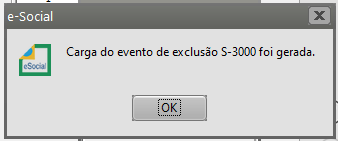
Quando o sistema gera o evento S3000 - Exclusão é necessário que ele seja concluído com sucesso para efetivamente eliminar o modo geração desejado. Lembrando que, para transmissão dos eventos é necessário enviar a remuneração antes do pagamento, porém na ordem de exclusão e retificação é o oposto, sendo necessário excluir o pagamento primeiro e depois a remuneração.

[![image.png](https://autoatendimento.grupoallegus.com.br/uploads/images/gallery/2024-11/scaled-1680-/F8rimage.png)](https://autoatendimento.grupoallegus.com.br/uploads/images/gallery/2024-11/F8rimage.png)
[![image.png](https://autoatendimento.grupoallegus.com.br/uploads/images/gallery/2024-11/scaled-1680-/WJiimage.png)](https://autoatendimento.grupoallegus.com.br/uploads/images/gallery/2024-11/WJiimage.png)
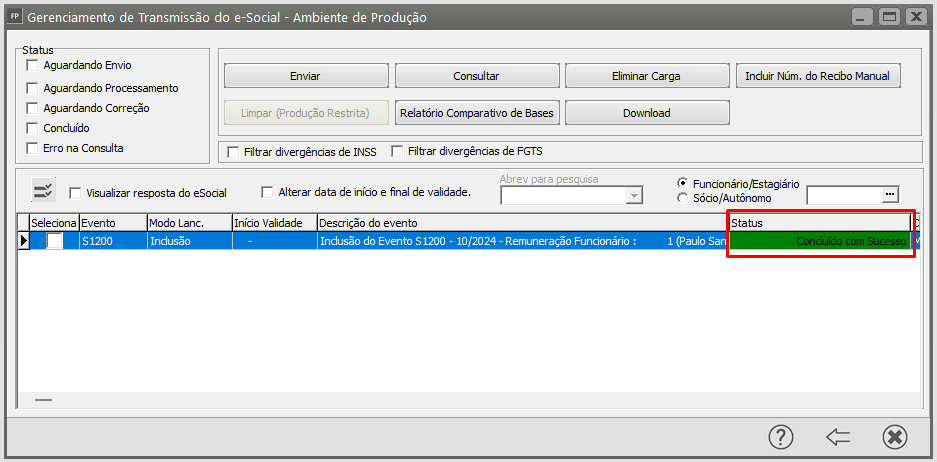
Outra forma de exclusão, seria através da ficha financeira no menu **Movimentação&gt;Rotinas Anuais&gt;Ficha Financeira - filtro pelo código e o modo geração - clique no ícone da lixeira para eliminar todos os eventos.** Em seguida, elimine também das datas de pagamento em **Movimentação&gt;Rotinas Mensais Datas de Pagamento**, possibilitando uma nova geração em seguida.

**Caso preferir, poderá realizar a exclusão dos eventos diretamente no portal do eSocial concluindo o s3000 manualmente.**

<p class="callout success"><span style="color: rgb(224, 62, 45);">**Cargas Manuais Gerenciamento de Transmissão**</span></p>

Caso haja necessidade de gerar manualmente o evento de exclusão, clique em **carga manual dos eventos:**

<span id="bkmrk--20" style="font-weight: normal;"><span style="font-size: 11pt; font-family: Arial, sans-serif; color: rgb(0, 0, 0); background-color: transparent; font-weight: 400; font-style: normal; font-variant: normal; white-space-collapse: preserve;"><span style="border-width: initial; border-style: none; display: inline-block; overflow: hidden; width: 602px; height: 296px;">![](https://lh7-rt.googleusercontent.com/docsz/AD_4nXfkqfZslXqOn__LLO3AKBv7J2htNrG5E-3-sC3YfWGRqaykD0lwsdTTtzxC6Uupnzl059n-Q3vb4agi177CuIy1taMSugZc7NyAi1RuSMR13iP9_3rkBAGk_UUCY4yfbrIgRs-w?key=C4Z4UvYAVS9pwuvbrXfRsk6R)</span></span></span>

- Selecione o evento que deseja excluir, exemplo S-1200 - Remuneração;
- Informe o Tipo de Carga como Arquivo de Exclusão;
- Selecione o evento original com respectivo número de recibo através do ícone:

<span id="bkmrk--22" style="font-weight: normal;"><span style="font-size: 11pt; font-family: Arial, sans-serif; color: rgb(0, 0, 0); background-color: transparent; font-weight: 400; font-style: normal; font-variant: normal; white-space-collapse: preserve;"><span style="border-width: initial; border-style: none; display: inline-block; overflow: hidden; width: 602px; height: 316px;">![](https://lh7-rt.googleusercontent.com/docsz/AD_4nXeFtWmLo-oz8ih-k0FUDjFzwGeHIRooHk9FJngn_qw9wKJ6FI0ErdA2d9YyIVq4SqmvkLjy2QBAQY7Bt-AXFC5qPa-OYRi6PYUpFmUwxLe1OshnS9OAbTmNBkFFFsxAe9te7oi0UQ?key=C4Z4UvYAVS9pwuvbrXfRsk6R)</span></span></span>

<span id="bkmrk--24" style="font-weight: normal;"><span style="font-size: 11pt; font-family: Arial, sans-serif; color: rgb(0, 0, 0); background-color: transparent; font-weight: 400; font-style: normal; font-variant: normal; white-space-collapse: preserve;"><span style="border-width: initial; border-style: none; display: inline-block; overflow: hidden; width: 602px; height: 311px;">![](https://lh7-rt.googleusercontent.com/docsz/AD_4nXcFFu1dp6o0rnTMv2IkkgQceb3AI5unZMd7VImpu1oJWSyP1XHkGx98HCWXnMAmoDUbtbBHonybGTXOBBTntxhacTqMTEOKUBx0J7C0EGv6XiIlFtfm4LprgMh_y-OimvuiUWdi7g?key=C4Z4UvYAVS9pwuvbrXfRsk6R)</span></span></span>

OBS: Para conferir o número de recibo poderá avançar na barra até o final:

<span id="bkmrk--26" style="font-weight: normal;"><span style="font-size: 11pt; font-family: Arial, sans-serif; color: rgb(0, 0, 0); background-color: transparent; font-weight: 400; font-style: normal; font-variant: normal; white-space-collapse: preserve;"><span style="border-width: initial; border-style: none; display: inline-block; overflow: hidden; width: 478px; height: 363px;">![](https://lh7-rt.googleusercontent.com/docsz/AD_4nXeUchN6oyuTLNqBh9jW7efeH3BcyqmDXUv42RRIcltq9RoAnEgMJLfZcC-jCRQVmuW65ORqTlNcRguQRgLKNJ3QEDnF5oL-ppV8pIdUasix0Zzo0KaREjUKK7DK5CrAKkJ30w4Npg?key=C4Z4UvYAVS9pwuvbrXfRsk6R)</span></span></span>

<span id="bkmrk--28" style="font-weight: normal;"><span style="font-size: 11pt; font-family: Arial, sans-serif; color: rgb(0, 0, 0); background-color: transparent; font-weight: 400; font-style: normal; font-variant: normal; white-space-collapse: preserve;"><span style="border-width: initial; border-style: none; display: inline-block; overflow: hidden; width: 602px; height: 317px;">![](https://lh7-rt.googleusercontent.com/docsz/AD_4nXc81QCtNd1y9n1iboHWooq6V88U_5-iFIAdOlkqrOjkKfplF6C-e30IGLTIyXAjU-rF_68Fx2UqJXZORje23AeMINYYMcAG6xe_0T5ilbvr7D-CW2adH3O5YFywidxVJhVS41Sp_A?key=C4Z4UvYAVS9pwuvbrXfRsk6R)</span></span></span>

**Veja também os Itens:**

- [Gerando Pagamento Mensal dos Funcionários](https://autoatendimento.grupoallegus.com.br/books/fp/page/gerando-pagamento-mensal-dos-funcionarios)
- [Gerando Pagamento de Férias](https://autoatendimento.grupoallegus.com.br/books/fp/page/gerando-pagamento-de-ferias-N2Y)
- [Gerando Adiantamento Salarial](https://autoatendimento.grupoallegus.com.br/books/fp/page/gerando-adiantamento-salarial-8gS)
- [Gerando Pagamento de Rescisão Contratual](https://autoatendimento.grupoallegus.com.br/books/fp/page/gerando-pagamento-de-rescisao-MoJ)
- [Gerando Pagamento de Adiantamento de 13º Salário](https://autoatendimento.grupoallegus.com.br/books/fp/page/gerando-pagamento-de-adiantamento-de-13o-salario)
- [Gerando Adiantamento Salarial para Sócios](https://autoatendimento.grupoallegus.com.br/books/fp/page/gerando-adiantamento-salarial-para-socios-NP5)
- [Gerando Pagamento de 13º Salário - Parcela Final](https://autoatendimento.grupoallegus.com.br/books/fp/page/gerando-pagamento-de-13o-salario-parcela-final-s5H)
- [Gerando P.L.R. - Participação nos Lucros e Resultados](https://autoatendimento.grupoallegus.com.br/books/fp/page/gerando-plr-participacao-nos-lucros-e-resultados)
- [Gerando Pagamento Mensal dos Funcionários Domésticos](https://autoatendimento.grupoallegus.com.br/books/fp/page/gerando-pagamento-mensal-dos-funcionarios-domesticos-3HS)
- [Gerando Pagamento Mensal dos Funcionários - Professores](https://autoatendimento.grupoallegus.com.br/books/fp/page/gerando-pagamento-mensal-dos-funcionarios-professores-aUt)
- [Gerando Pagamento dos Funcionários - Locação de Mão de Obra e Construção Civil](https://autoatendimento.grupoallegus.com.br/books/fp/page/gerando-pagamento-dos-funcionarios-locacao-de-mao-de-obra-e-construcao-civil-oPt)
- [Gerando Pagamento Mensal dos Funcionários - Contrato Determinado](https://autoatendimento.grupoallegus.com.br/books/fp/page/gerando-pagamento-mensal-dos-funcionarios-contrato-determinado-qDo)
- [Gerando Pagamento dos Funcionários - Estagiários](https://autoatendimento.grupoallegus.com.br/books/fp/page/gerando-pagamento-dos-funcionarios-estagiarios-dWj)
- [Gerando Folha de Pagamento Complementar](https://autoatendimento.grupoallegus.com.br/books/fp/page/gerando-folha-de-pagamento-complementar-I3E)
- [Gerando Adiantamento Salarial para Autônomos](https://autoatendimento.grupoallegus.com.br/books/fp/page/gerando-adiantamento-salarial-para-autonomos-mDx)
- [Gerando Folha de Pagamento de Sócios e Autônomos](https://autoatendimento.grupoallegus.com.br/books/fp/page/gerando-folha-de-pagamento-de-socios-e-autonomos-MVr)
- [Gerando Pagamento Mensal dos Funcionários Mensalistas](https://autoatendimento.grupoallegus.com.br/books/fp/page/gerando-pagamento-mensal-dos-funcionarios-mensalistas-7gT)
- [Gerando Pagamento Mensal dos Funcionários - Horistas](https://autoatendimento.grupoallegus.com.br/books/fp/page/gerando-pagamento-mensal-dos-funcionarios-horistas-1Yp)
- [Gerando Holleriths de Funcionários](https://autoatendimento.grupoallegus.com.br/books/fp/page/gerando-holleriths-de-funcionarios-zT4)
- [Gerando Holleriths de Sócios e Autônomos](https://autoatendimento.grupoallegus.com.br/books/fp/page/gerando-holleriths-de-socios-e-autonomos-45w)
- [Gerando Rescisão por Motivo de Acordo](https://autoatendimento.grupoallegus.com.br/books/fp/page/gerando-rescisao-por-motivo-de-acordo)
- [Gerando Folha de Pagamento de Meses Anteriores](https://autoatendimento.grupoallegus.com.br/books/fp/page/gerando-folha-de-pagamento-de-meses-anteriores)
- [Geração de Férias Coletivas](https://autoatendimento.grupoallegus.com.br/books/fp/page/geracao-de-ferias-coletivas)
- [Cadastro, Convocação e Geração de Hollerith de Funcionário Intermitente](https://autoatendimento.grupoallegus.com.br/books/fp/page/cadastro-convocacao-geracao-de-hollerith-e-desligamento-de-funcionario-intermitente)
- [Memória de Cálculo dos Eventos na Tela de Geração](https://autoatendimento.grupoallegus.com.br/books/fp/page/memoria-de-calculo-dos-eventos-na-tela-de-geracao)
- [Alterando os Valores Gerados nos Pagamentos](https://autoatendimento.grupoallegus.com.br/books/fp/page/alterando-os-valores-gerados-nos-pagamentos-8uS)
- [Excluindo Gerações](https://autoatendimento.grupoallegus.com.br/books/fp/page/excluindo-geracoes)
- [Inconsistências e Erros no envio do evento S1200 para o Portal do eSocial](https://autoatendimento.grupoallegus.com.br/books/esocial/chapter/esocial-s1200)
- [Inconsistências e Erros no envio do evento S1210 para o Portal do eSocial](https://autoatendimento.grupoallegus.com.br/books/esocial/chapter/esocial-s1210)