# Relatório Gráfico de Defeitos

<span style="color: rgb(0, 0, 0); font-family: Arial; font-size: small;"><iframe allowfullscreen="allowfullscreen" height="314" src="https://www.youtube.com/embed/sQN7lkoRy3E" width="560"></iframe>

</span>

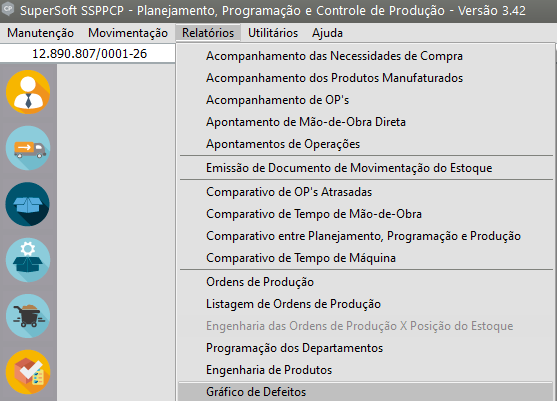
<span style="color: rgb(0, 0, 0); font-family: Arial; font-size: small;">Para emitir o relatório gráfico de Defeitos, acesse o menu **Relatórios/Gráfico de Defeitos**.</span>

[![image.png](https://autoatendimento.grupoallegus.com.br/uploads/images/gallery/2024-01/scaled-1680-/vugimage.png)](https://autoatendimento.grupoallegus.com.br/uploads/images/gallery/2024-01/vugimage.png)

<span style="color: rgb(0, 0, 0); font-family: Arial; font-size: small;">Este relatório é muito importante na análise das [perdas](https://autoatendimento.grupoallegus.com.br/books/cp/page/cadastrando-perdas-de-producao) existentes dentro do processo produtivo, possibilitando que sejam tomadas ações que combatam diretamente o foco do problema.</span>

[![image.png](https://autoatendimento.grupoallegus.com.br/uploads/images/gallery/2024-01/scaled-1680-/DKEimage.png)](https://autoatendimento.grupoallegus.com.br/uploads/images/gallery/2024-01/DKEimage.png)

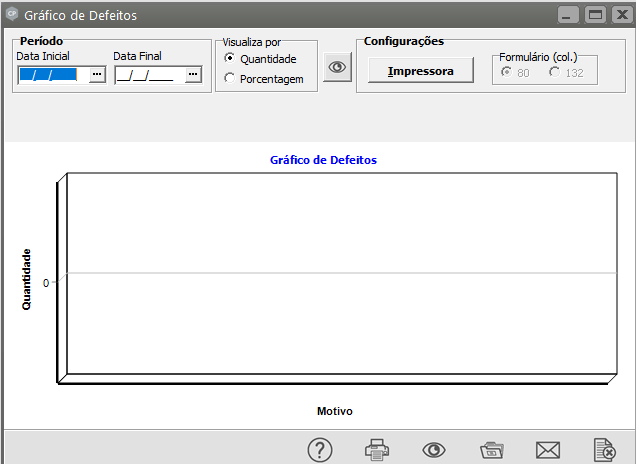
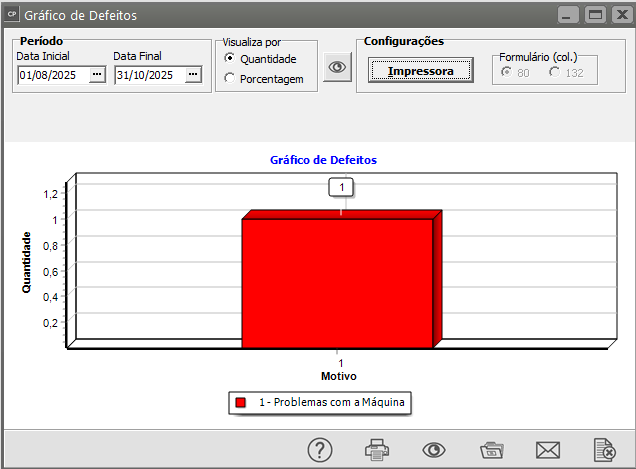
<span style="color: rgb(0, 0, 0); font-family: Arial; font-size: small;">Para emitir o relatório, escolha o período desejado e o modo de visualização - se por porcentagem ou quantidade - e, em seguida, pressione o botão </span>[![image.png](https://autoatendimento.grupoallegus.com.br/uploads/images/gallery/2024-01/scaled-1680-/Q59image.png).](https://autoatendimento.grupoallegus.com.br/uploads/images/gallery/2024-01/Q59image.png)

<span style="color: rgb(0, 0, 0); font-family: Arial; font-size: small;">.</span>[![image.png](https://autoatendimento.supersoft.com.br/uploads/images/gallery/2025-08/scaled-1680-/0iZimage.png)](https://autoatendimento.supersoft.com.br/uploads/images/gallery/2025-08/0iZimage.png)