# Cadastrando Problemas e Soluções (para Sistema SAC)

<span style="color: rgb(0, 0, 0); font-family: Arial; font-size: small;"><iframe allowfullscreen="allowfullscreen" height="314" src="https://www.youtube.com/embed/h9CzVPx7xcU" width="560"></iframe>

</span>

<span style="color: rgb(0, 0, 0); font-family: Arial; font-size: small;">Neste item você poderá cadastrar os **problemas frequentes** que ocorrem com seus [clientes](https://autoatendimento.grupoallegus.com.br/books/cp/page/cadastrando-clientes) e sua possível solução para auxiliar seus[ técnicos](https://autoatendimento.grupoallegus.com.br/books/cp/page/cadastrando-tecnicos-e-operadores) ao dar atendimento e executar ordens de serviço.</span>

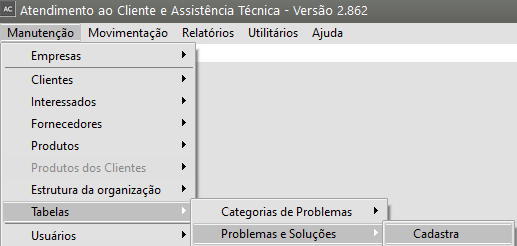
<span style="color: rgb(0, 0, 0); font-family: Arial; font-size: small;">Para cadastrá-los, acesse o menu **Manutenção/Tabelas/Problemas e Soluções**.</span>

[![image.png](https://autoatendimento.grupoallegus.com.br/uploads/images/gallery/2024-10/scaled-1680-/Cltimage.png)](https://autoatendimento.grupoallegus.com.br/uploads/images/gallery/2024-10/Cltimage.png)

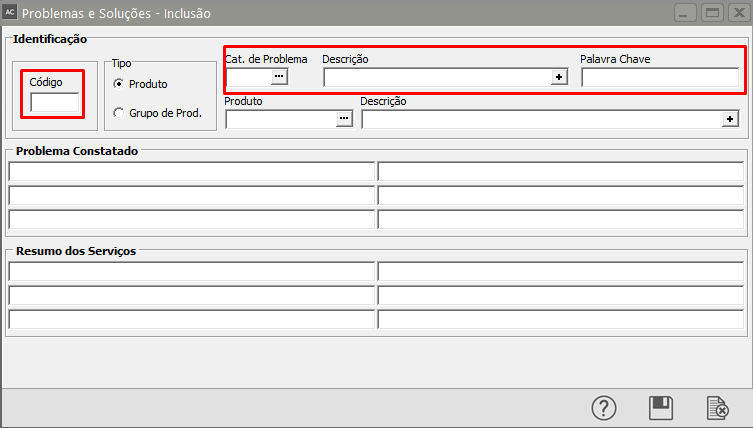
<span style="color: rgb(0, 0, 0);">![](http://help.supersoft.com.br/AP/imagens/CadastrandoProblemasSolucoes1.png)</span><span style="color: rgb(0, 0, 0); font-family: Arial; font-size: small;">Você deverá informar um **código** para o problema, sua **categoria** (que pode ser cadastrada através do menu **Manutenção/Tabelas/Categorias de Problemas**). O problema cadastrado pode ser de um produto específico ou que ocorre para qualquer produto. Caso seja um problema genérico, deixe o campo **Produto** em branco.</span>

[![image.png](https://autoatendimento.grupoallegus.com.br/uploads/images/gallery/2024-10/scaled-1680-/Gqfimage.png)](https://autoatendimento.grupoallegus.com.br/uploads/images/gallery/2024-10/Gqfimage.png)

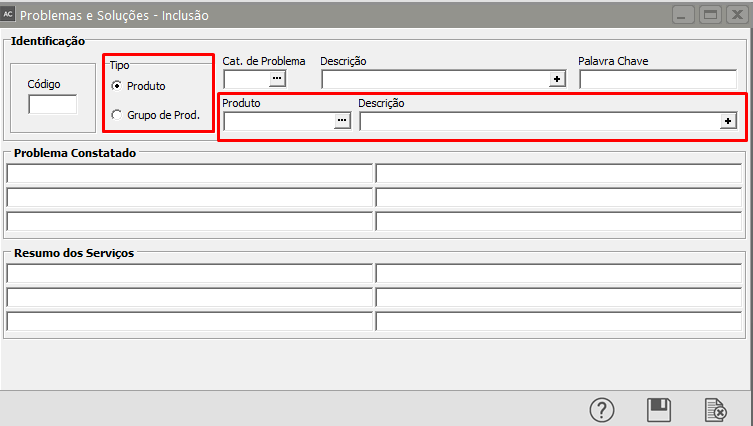
<span style="color: rgb(0, 0, 0); font-family: Arial; font-size: small;">**Tipo**: você poderá cadastrar um problema para um único produto ou para um grupo de produtos</span>

<span style="color: rgb(0, 0, 0);">**<span style="font-family: Arial; font-size: small;">Produto</span>**</span>

<span style="color: rgb(0, 0, 0);">![](http://help.supersoft.com.br/AP/imagens/CadastrandoProblemasSolucoes2.png)</span>[![image.png](https://autoatendimento.grupoallegus.com.br/uploads/images/gallery/2024-10/scaled-1680-/4Izimage.png)](https://autoatendimento.grupoallegus.com.br/uploads/images/gallery/2024-10/4Izimage.png)

<span style="color: rgb(0, 0, 0);">**<span style="font-family: Arial, Helvetica, sans-serif; font-size: small;">Grupo de Produto</span>**</span>

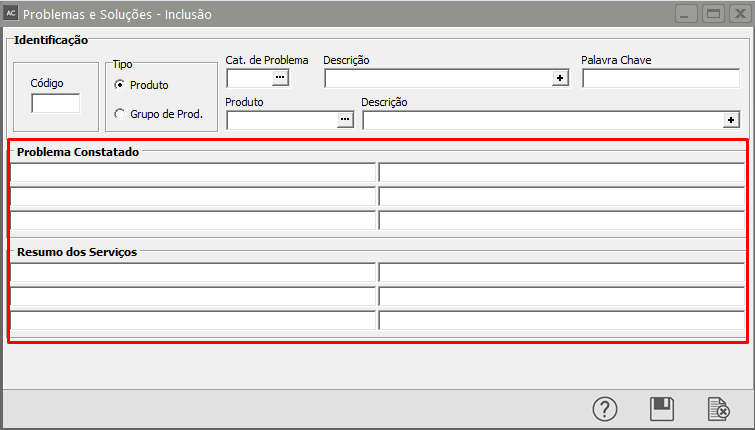
<span style="color: rgb(0, 0, 0);">![](http://help.supersoft.com.br/AP/imagens/CadastrandoProblemasSolucoes3.png)</span><span style="color: rgb(0, 0, 0); font-family: Arial; font-size: small;">Você deverá informar também o **problema constatado** e o **resumo dos serviços**..</span>

[![image.png](https://autoatendimento.grupoallegus.com.br/uploads/images/gallery/2024-10/scaled-1680-/9Ooimage.png)](https://autoatendimento.grupoallegus.com.br/uploads/images/gallery/2024-10/9Ooimage.png)