# Utilizando o Arquivo Morto
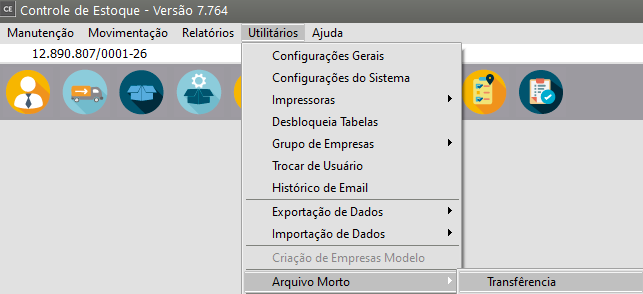
Com o passar do tempo os arquivos de movimentação do Sistema tornam-se sobrecarregados de informações, o que poderá ocasionar lentidão no Sistema. Para evitar este tipo de problema, os dados de **anos anteriores** podem ser enviados para o **Arquivo Morto**, liberando o arquivo principal destas informações que não são frequentemente acessadas.**1) Para realizar a Transferência**Acesse o menu **Utilitários/Arquivo Morto/Transferência**
[](https://autoatendimento.supersoft.com.br/uploads/images/gallery/2023-11/q8iimage.png)
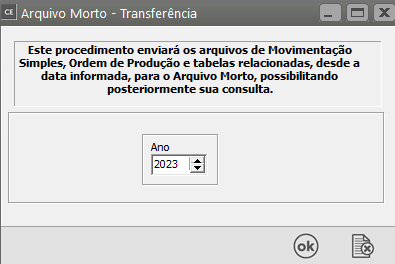
Defina o ano que deverá ser enviado para o **arquivo morto** e clique **OK**.
[](https://autoatendimento.supersoft.com.br/uploads/images/gallery/2023-11/4Hfimage.png)
**IMPORTANTE: **Lembre-se de que as informações enviadas para o **arquivo morto somente podem ser acessadas para consulta**. Então, somente envie períodos antigos, ou seja, para os quais **não irão ocorrer mudanças** ou **não haja a necessidade de impressão de relatórios.**
[](https://autoatendimento.supersoft.com.br/uploads/images/gallery/2023-11/tx4image.png)
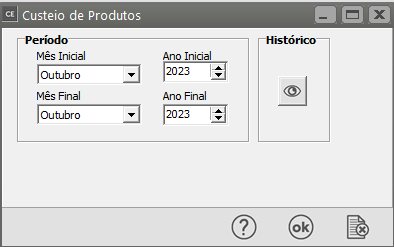
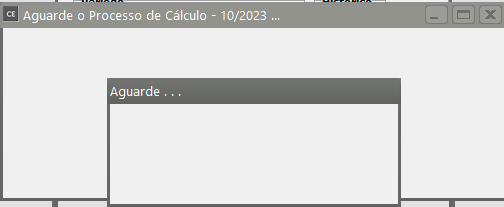
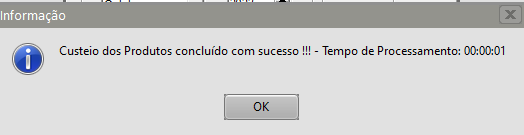
No momento de enviar as movimentações para o **Arquivo Morto**, o sistema irá pedir a realização do [Custeio](https://autoatendimento.grupoallegus.com.br/books/ce/page/realizando-o-custeio-dos-produtos-e-da-producao)
[](https://autoatendimento.supersoft.com.br/uploads/images/gallery/2023-11/A23image.png)
[](https://autoatendimento.supersoft.com.br/uploads/images/gallery/2023-11/8Aximage.png)
[](https://autoatendimento.supersoft.com.br/uploads/images/gallery/2023-11/Yp3image.png)
[](https://autoatendimento.supersoft.com.br/uploads/images/gallery/2023-11/sCOimage.png)
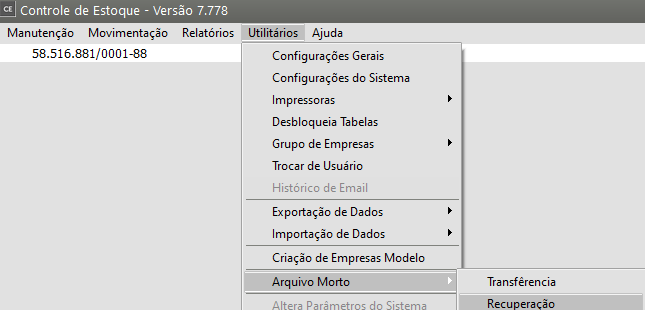
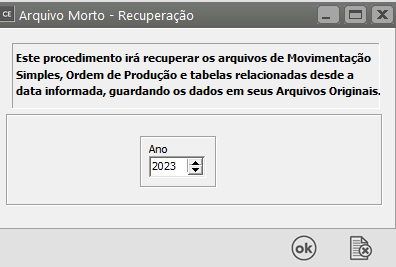
**2) Para realizar a Recuperação**Caso seja enviada alguma informação para o **arquivo morto** e haja necessidade de emitir **relatórios do período enviado**, você poderá **Recuperar estes dados**, ou seja, retornar os dados do **arquivo morto** para o arquivo principal. Para isso, acesse o menu **Utilitários/Arquivo Morto/Recuperação** e informe o período que deseja recuperar.
[](https://autoatendimento.grupoallegus.com.br/uploads/images/gallery/2024-10/YeWimage.png)
[](https://autoatendimento.supersoft.com.br/uploads/images/gallery/2023-11/SpHimage.png)
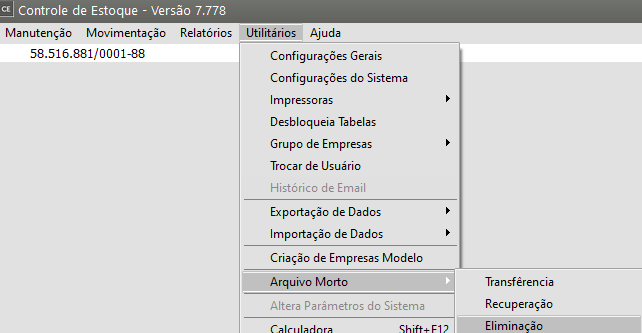
**3) Para realização a Eliminação do Arquivo Morto**Existe também a possibilidade de **exclusão definitiva** de todos os movimentos que estão no **arquivo morto**. Para isso, acesse o menu **Utilitários/Arquivo Morto/Eliminação**.
[](https://autoatendimento.grupoallegus.com.br/uploads/images/gallery/2024-10/4ACimage.png)
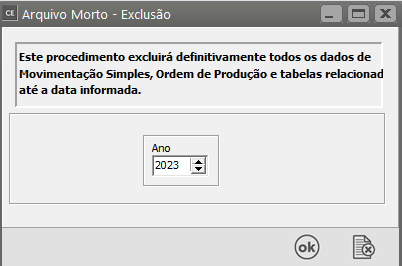
Mas, **ATENÇÃO**: Você somente deve excluir os dados que tem certeza que **não precisará mais acessar nem tirar relatórios**. Esta **exclusão é definitiva**, sem possibilidade de recuperação. Recomendamos que os dados somente sejam definitivamente excluídos depois que você executar uma [**cópia de segurança**](https://autoatendimento.grupoallegus.com.br/books/ce/page/mantendo-a-seguranca-do-sistema-copia-de-seguranca) extra destes dados (ver item [Mantendo a Segurança do Sistema).](https://autoatendimento.grupoallegus.com.br/books/ce/page/mantendo-a-seguranca-do-sistema-copia-de-seguranca)
[](https://autoatendimento.supersoft.com.br/uploads/images/gallery/2023-11/IbWimage.png)
**4) Para Visualizar as Informações enviadas para o Arquivo Morto**
**a)[ Movimentação Simples](https://autoatendimento.grupoallegus.com.br/books/ce/page/cadastrando-movimentacao-simples)**
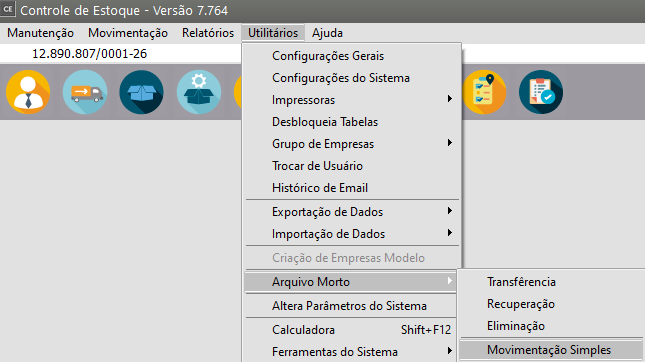
Para visualizar as **[Movimentações Simples](https://autoatendimento.grupoallegus.com.br/books/ce/page/cadastrando-movimentacao-simples)** enviadas para o **Arquivo Morto**, acesse o menu **Utilitários>Arquivo Morto>Movimentação Simples**
[](https://autoatendimento.supersoft.com.br/uploads/images/gallery/2023-11/H9Simage.png)
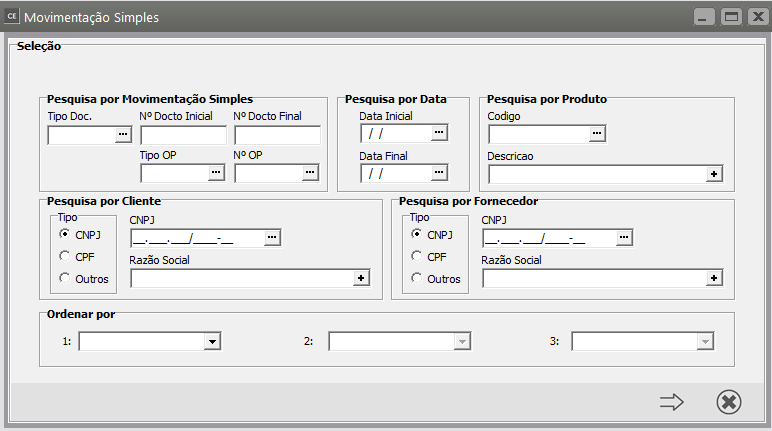
Filtre as informações para que seja mais fácil a visualização que deseja
[](https://autoatendimento.supersoft.com.br/uploads/images/gallery/2023-11/Yqlimage.png)
**b) [Ordens de Produção](https://autoatendimento.grupoallegus.com.br/books/ce/page/cadastrando-ordens-de-producao)**
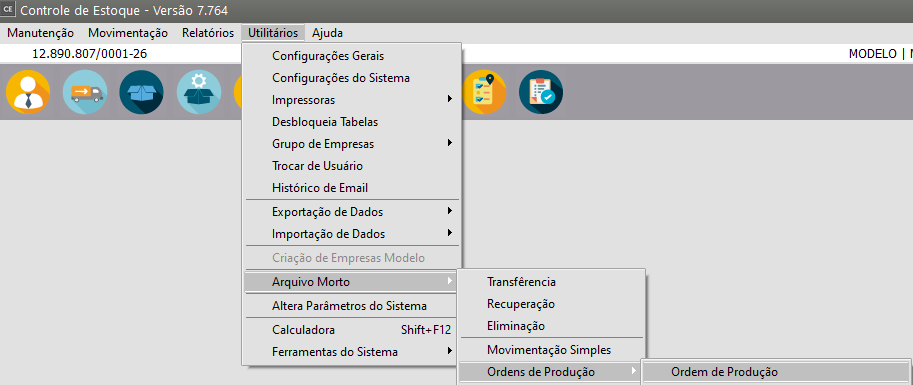
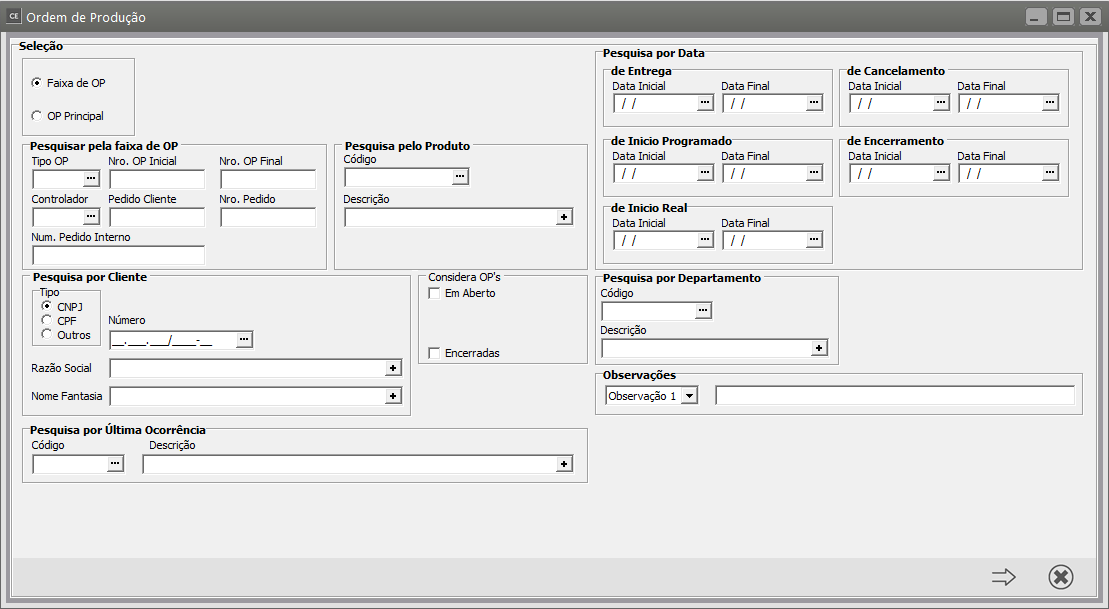
Para visualizar as [Ordens de Produção](https://autoatendimento.grupoallegus.com.br/books/ce/page/cadastrando-ordens-de-producao) enviadas para o **Arquivo Morto,** acesse o menu **Utilitários>Arquivo Morto>Ordens de Produção>Ordem de Produção**
[](https://autoatendimento.supersoft.com.br/uploads/images/gallery/2023-11/5MZimage.png)
[](https://autoatendimento.supersoft.com.br/uploads/images/gallery/2023-11/Ouuimage.png)
**c) [A](https://autoatendimento.grupoallegus.com.br/books/ce/page/realizando-apontamento-de-mao-de-obra-direta)[pontamento de Mão de Obra](https://autoatendimento.grupoallegus.com.br/books/ce/page/realizando-apontamento-de-mao-de-obra-direta)**
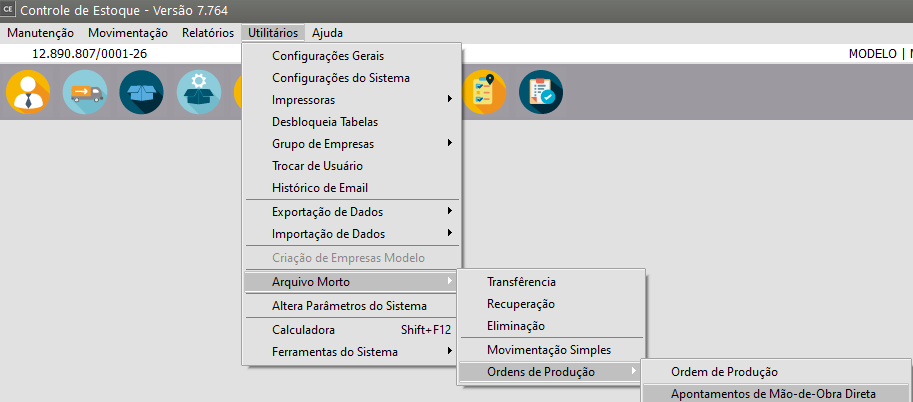
Para visualizar os [Apontamentos de Mão de Obra ](https://autoatendimento.grupoallegus.com.br/books/ce/page/realizando-apontamento-de-mao-de-obra-direta)enviados para o **Arquivo Morto**, acesse o menu **Utilitários>Arquivo Morto>Ordens de Produção>Apontamento de Mão de Obra**
[](https://autoatendimento.supersoft.com.br/uploads/images/gallery/2023-11/gNfimage.png)
**d) [Outros Custos](https://autoatendimento.grupoallegus.com.br/books/ce/page/agregando-custo-as-ordens-de-producao)**
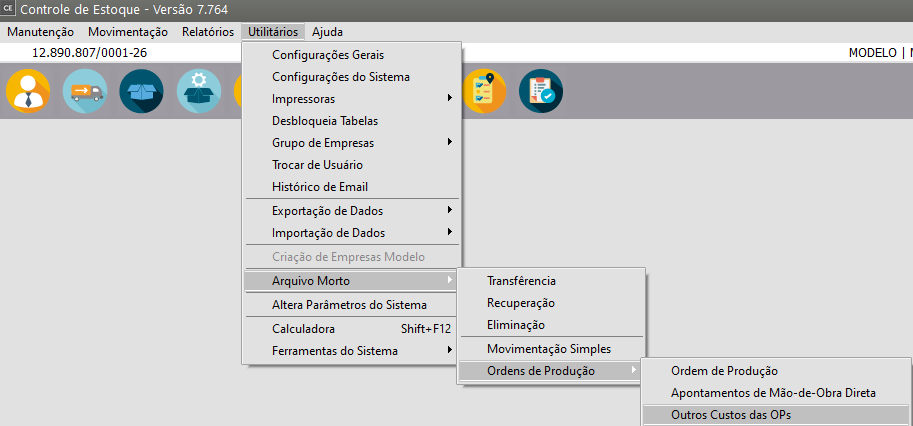
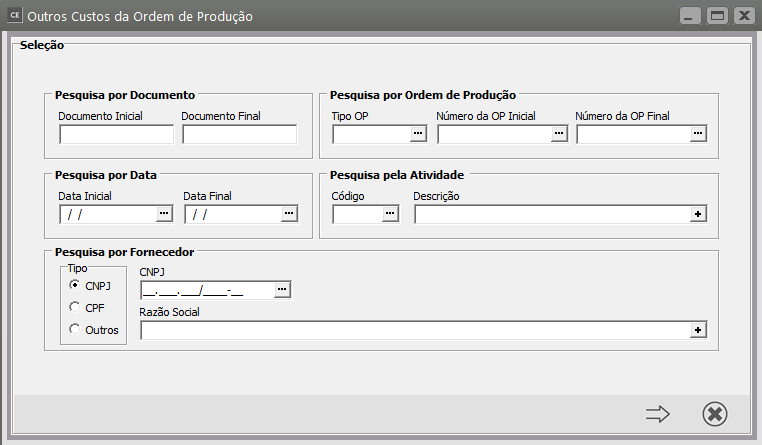
Para visualizar os [Outros Custos Agregados às Ordens de Produção ](https://autoatendimento.grupoallegus.com.br/books/ce/page/agregando-custo-as-ordens-de-producao)enviadas para o **Arquivo Morto**, acesse o menu **Utilitários>Arquivo Morto>Ordens de Produção>Outros Custos das OPs**
[](https://autoatendimento.supersoft.com.br/uploads/images/gallery/2023-11/bTRimage.png)
[](https://autoatendimento.supersoft.com.br/uploads/images/gallery/2023-11/siYimage.png)
**e) [Apontamento (encerramento) de Ordens de Produção](https://autoatendimento.grupoallegus.com.br/books/ce/page/encerramento-de-ordens-de-producao)**
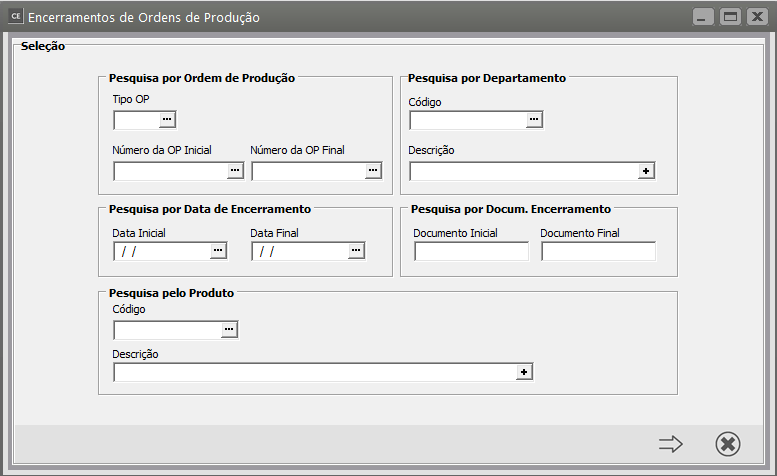
Para visualizar os [Apontamentos (encerramentos) das Ordens de Produção](https://autoatendimento.grupoallegus.com.br/books/ce/page/encerramento-de-ordens-de-producao) enviadas para o **Arquivo Morto**, acesse o menu **Utilitários>Arquivo Morto>Ordens de Produção>Apontamentos de Ordens de Produção**[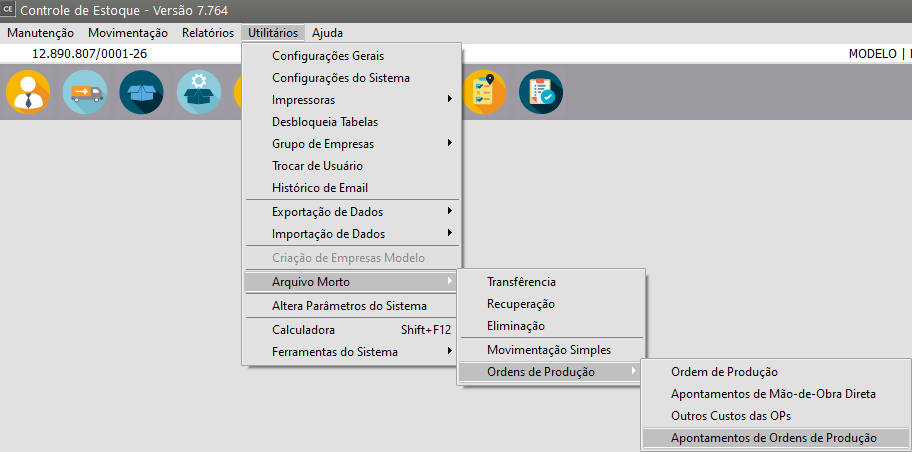](https://autoatendimento.supersoft.com.br/uploads/images/gallery/2023-11/BXJimage.png)
[](https://autoatendimento.supersoft.com.br/uploads/images/gallery/2023-11/8yjimage.png)